Showing posts with label blog template. Show all posts

Bring Your Blog to Life with a New WordPress Theme

As bloggers, we always want our blogs to look the best they can. While a custom designed blog theme is nearly always the best way to go, not all of us have the necessary funds to hire a design team to create our blogs. The next best option is to find a quality wordpress theme that fits your blog style.
ThemeFuse is a sites that offers a wide variety of high quality and fancy looking wordpress themes that include an easy one click auto install. Right when you get to their web site you can see they have a clean and sleek design, which is also seen in many of their wordpress themes.


The cost of ThemeFuse original wordpress themes is $49 each, but you also have the option to access all 13 of their themes for $349 (which comes out to $26 per theme). If you look through their collection of themes and really only see one that fits your blog concept, I’d recommend picking up that one theme. If you have a network of blogs, you can save in the long run by picking up the package.
Looking through the blog themes available on the site, you will notice that many of them are product/niche specific. The MobilityApp is a theme for pushing mobile applications, and Freshfolio is a theme for displaying a web site or digital gallery.
Another feature on the site I liked is the Showcase area, which allows you to see other web sites that are running off the ThemeFuse themes, but have also customized the themes to match the look and feel of their blog. This will help you when looking at different themes and giving you an idea on how you can match the content with your current blog structure.
As a user of FuseTheme, you will also have access to their after care support, which includes their active forum with over 14,000 posts.
You can also “Like” FuseTheme on Facebook (and Twitter) and save $10 towards the purchase of a theme from their web site.

Original Article by: http://www.bloggingtips.com
Read More!

How to Engage With Your Readers to get More Results

Have you tried all you can to get traffic to your blog to no avail?
Have you tried promoting your products to your readers but you find it difficult to progress?
Do you find it difficult to get comments and social media shares of your blog posts?
If you answered yes to one or all of the above questions then it is time to rethink your blogging strategy.
It is true you will have to market your blog to get visitors coming but you need to start thinking about the difference between getting visitors and retaining them. Since there is no point in getting readers that don’t take action or stick to your blog you need to start thinking less about marketing and more about retaining visitors, and one of the best ways to ensure you get the best from visitors to your blog is by engaging with them.
Everybody loves to be involved, that’s why news spread faster. There’s satisfaction in involvement, especially if it is from someone whom you so much respect and that is why you will quickly go far if you can learn to start engaging with your readers from today. This blog post will be giving you a few tips to help you get more results through engaging with your readers.
Encourage Reader Discussion
If you’ve been in business for more than a day now you should know the importance of call to actions. A lot of things sound so simple but you’ll be amazed at how people don’t do them. Sending an email to your list won’t necessary result in replies, but telling your readers you want to hear from them can result in more emails than you can answer.
People know what to do, but they sometimes need external instruction to do it. Whenever you write a new blog post let your readers know you want to hear from them, whenever you send an email let your readers know you want to hear from them, whenever you’re on your favorite social media site let your readers know you’re willing to hear from them. By constantly interacting with you they will begin to feel like they already know you and it will be difficult for them to leave you just like that.
The best way to encourage reader interaction is by asking for it, so start asking today!
Take Time to be there for them
One thing so many of us bloggers fail to do is being there for our readers. The funny thing about this is that it looks so simple but can be very powerful.
I recently read an article about Joe Girard on DailyBlogTips. I really enjoyed the article and I retweeted it, even though I didn’t tag Joe Girard in the retweet he ended up replying and thanking me for the retweet. That alone won me over, and I became a follower immediately.
People appreciate you being there for them so start letting your readers know you care for them by taking the time to reply their comments, reply their emails, thank and interact with them on their favorite social media sites and you will see how much of a significant impact that alone can make.
Appreciate Reader Discussion
You can also encourage reader engagement and interaction by appreciating your readers for engaging with you and others in your blog. This can be done in so many ways which can include running contests, featuring and linking to top readers, and even sometimes personally emailing readers to let them know you appreciate their support.
They usually won’t expect you to appreciate them, and that is exactly the magic of this formula. Make sure you let your readers know that you appreciate their support and engagement and you will see how much you can achieve with that.

Original Article: http://www.bloggingtips.com
Read More!

Top 10 Blogger Template that will make your blog attractive


Another Top 10 templates for your [d0t]blogspot[d0t]com templates.

Note: this is apply for blogger.com template


1.   http://www.bestbloggertemplates.net/2011/07/roca-magazine-blogger-template.html
2.    http://www.bestbloggertemplates.net/2011/07/fausto-magazine-free-blogger-template.html
3.   http://www.bestbloggertemplates.net/2011/07/itablet-tech-blogger-template.html
4.   http://www.bestbloggertemplates.net/2011/07/degoy-bright-magazine-blogger-template.html
5.   http://www.bestbloggertemplates.net/2011/07/android-phone-technology-blogger.html
6.   http://www.bestbloggertemplates.net/2011/07/epione-sleek-magazine-blogger-template.html
7.   http://www.bestbloggertemplates.net/2011/07/game-maniac-video-game-blogger-template.html
8.   http://www.bestbloggertemplates.net/2011/07/suv-games-cars-theme-blogger-template.html
9.   http://www.bestbloggertemplates.net/2011/07/cupid-retro-design-blogger-template.html
10. http://www.bestbloggertemplates.net/2011/07/mularonis-free-premium-blogger-template.html


Template by:  http://www.bestbloggertemplates.net/

Read More!

Blospot templates: Best Blogger Template


The Latest Blogger Template


Demo <-->Download


Mahusay Blogger Template


Woodmag Blogger Template


Community Blogger Template


Dreamy Blogger Template


Turn Out Magazine Blogger Template


GameZine Blogger Template


Demo <--> Download

Silverstar Blogger Template


Simplex WorldNews Blogger Template


Solio Blogger Template


Tutorialicious Blogger Template


Demo <--> Download


WPStream Blogger Template


Demo <--> Download


Mayumi Blogger Template


Demo <--> Download


Promagazine Black Blogger Template


Demo <--> Download


Red Evo Aphelion Blogger Template


Rock Press Blogger Template


Rockwell Blogger Template


Demo <--> Download

Maamo Blogger Template


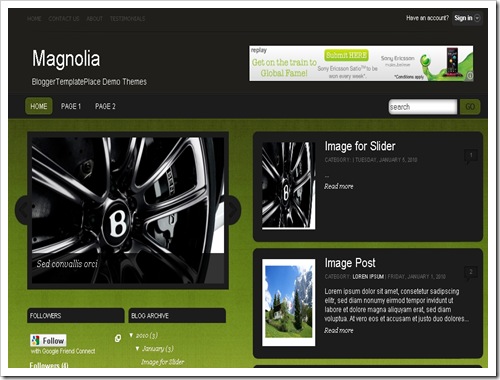
Magnolia Blogger Template


Demo <--> Download

MagzStyle V1.1 Blogger Template


Masikap 
Blogger Template


Matapat Blogger Template


Expi Blogger Template


Extend Blogger Template


Demo <--> Download


Framed Magazine Blogger Template


Green Harmony Blogger Template


Demo <--> Download


Ishthyle Blogger Template


Allurement Blogger Template


Demo <--> Download


ArgentPress Blogger Template


Demo <--> Download


Colorbold Blogger Template


Demo <--> Download

Ekologic Blogger Template


Demo <--> Download

Emperors Blogger Template


Demo <--> Download

Read More!

How do I put AdSense on my blog (using a classic template)?


The Quick Answer

  • Go to the Template | AdSense tab and sign up for AdSense, if necessary.
  • Select the size and color of your ads.
  • You'll see a preview of your blog as you make changes.
Note: This article assumes you are using a classic template. On a Layouts-enabled blog, just add a new page element and select the AdSense option.
Adding AdSense to your blog is easy. Go to the Template tab in Blogger and you'll see an "AdSense ads" tab below it:


If you don't have an AdSense account already, you can sign up for it right here within Blogger. Just enter a valid email address, choose a password, fill in some contact information (so you can get paid!) and then Blogger will register your account for you right away. If you do have an account already, just use the "sign in" link instead.
Once you've completed the sign-up form, or logged in to an existing account, you'll see a special preview version of your template, showing your blog as it will look with your new ads:
Using the menus above the preview, you can easily change the size, shape, and color of your ads, without ever needing to edit the code directly. The color menu has some preset color schemes, but also some flexible options that try to match, contrast, or blend with whatever template you happen to be using. Try them all out and see which setting works best.
 Once you've decided how you'd like it to look, just save the changes and republish your blog. Then go check your email.
While you were deciding on layouts and colors, you probably received a confirmation email from AdSense. Find that email and click on the link it gives you to confirm your email address. Be sure to read the rest of the confirmation email as well, since it will contain other information on finishing the registration and approval process. Until your email address is confirmed and your AdSense application is approved, your ads will only show public service announcements (PSAs) rather than targeted ads. Since you don't get revenue from PSAs, you'll want to be sure to do this soon, so the AdSense bot can crawl your site and determine appropriate ads to show.
And now you're done! Congratulations -- you've got AdSense!
Read More!